Load balancing GE HealthCare Centricity Cardio Workflow
Updated on November 20, 2025
•
Published on April 5, 2024
Benefits of load balancing GE HealthCare Centricity Cardio Workflow
The three main benefits of implementing load balancing for GE HealthCare Centricity Cardio Workflow are:
- High Availability (HA) and failover: Load balancing ensures that the Centricity Cardio Workflow system remains continuously available, which is vital in a healthcare setting where downtime directly impacts patient care and diagnosis. By distributing traffic (like image studies and retrieval requests) across multiple servers, the system eliminates any single point of failure. If one server fails, becomes unresponsive, or is taken offline for maintenance, the load balancer automatically and seamlessly redirects all incoming requests to the remaining healthy servers.
- Optimal performance and reduced latency: Load balancing intelligently distributes the workload, preventing any single server from becoming overwhelmed, which is crucial for handling large medical images and records. Requests are intelligently routed to the server with the least current load, ensuring efficient use of resources across the cluster. This balanced approach reduces latency and ensures rapid access to large cardiovascular images and documents, significantly improving workflow efficiency during high-volume periods (e.g., in the Emergency Department).
- Scalability for growth: Load-balanced architecture allows a healthcare organization to easily and grow without disruption by adapting its Centricity Cardio Workflow system. As patient volume increases, new imaging equipment is acquired, or new departments are added, IT staff can easily add new application or database servers to the cluster without disrupting the existing service. This design accommodates the massive, ongoing growth of medical imaging data, ensuring the CVIS system can scale to meet future demands.
About GE HealthCare’s Centricity Cardio Workflow
GE HealthCare’s Centricity Cardio Workflow is a cardiovascular information system (CVIS) and PACS that provides a single point of access for cardiologists. Configurable end-to-end workflows provide clinicians with seamless access to patient data, cardiovascular imaging, and reports. These powerful features improve staff productivity and accelerate patient diagnosis and treatment.
Centricity Cardio Workflow offers numerous advanced interfaces and solutions for a variety of different use cases, which means individual workflows can be optimized for maximum efficiency.
Together with the Centricity Universal Viewer, the Centricity Cardio Workflow forms part of Centricity Cardio Enterprise.
Why Loadbalancer.org for GE HealthCare Centricity Cardio Workflow?
This deployment guide isn’t theoretical; it has been field tested and rigorously validated by GE HealthCare experts. This means you can be completely confident that the solution described is robust, reliable, and backed by the real-world operational experience of a global leader in healthcare technology.
Loadbalancer’s intuitive Enterprise Application Delivery Controller (ADC) is designed to save time and money with a clever, not complex, WebUI.
Easily configure, deploy, manage, and maintain our Enterprise load balancer, reducing complexity and the risk of human error. For a difference you can see in just minutes.
And with WAF and GSLB included straight out-of-the-box, there’s no hidden costs, so the prices you see on our website are fully transparent.
More on what’s possible with Loadbalancer.org.
How to load balance GE HealthCare’s Centricity Cardio Workflow
The load balancer can be deployed in four fundamental ways: Layer 4 DR mode, Layer 4 NAT mode, Layer 4 SNAT mode, and Layer 7 Reverse Proxy (Layer 7 SNAT mode).
For Centricity Cardio Workflow, Layer 4 DR mode and Layer 7 Reverse Proxy mode are recommended.
Virtual service (VIP) requirements
To provide load balancing and HA for CCW, the following VIPs are required:
| Ref. | VIP Name | Mode | Port(s) | Persistence Mode | Health Check |
|---|---|---|---|---|---|
| VIP 1 | CCW_WEB_443 | Layer 7 Reverse Proxy | 443 | Source IP | Connect to Port |
| VIP 2 | CCW_WEB_8443 | Layer 7 Reverse Proxy | 8443 | HTTP Cookie | Connect to Port |
| VIP 3 | CCW_WEB_44301 | Layer 7 Reverse Proxy | 44301 | Source IP | Connect to Port |
| VIP 4 | CCW_WEB_8070-49200-49201 | Layer 7 Reverse Proxy | 8070, 49200, 49201 | Source IP | Connect to Port |
| VIP 5 | CCW_NOTIFICATION | Layer 7 Reverse Proxy | 44300 | Last Successful | HTTPS (GET) |
| VIP 6 | CCW_DICOMSERVICE_VS | Layer 4 DR | 104 | None | DICOM C-Echo |
| VIP 7 | CCW_DICOMSERVER_VS | Layer 4 DR | 1230 | None | DICOM C-Echo |
| VIP 8 | CCW_DICOM_1115 | Layer 4 DR | 1115 | None | DICOM C-Echo |
| VIP 9 | CCW_DICOM_1299 | Layer 4 DR | 1299 | None | DICOM C-Echo |
| VIP 10 | EMR_INBOUND | Layer 7 Reverse Proxy | 4001 | Last Successful | Connect to Port |
| VIP 11 | PORT_EMR_IB | Layer 7 Reverse Proxy | 4002 | Last Successful | Connect to Port |
Load balancing deployment concept
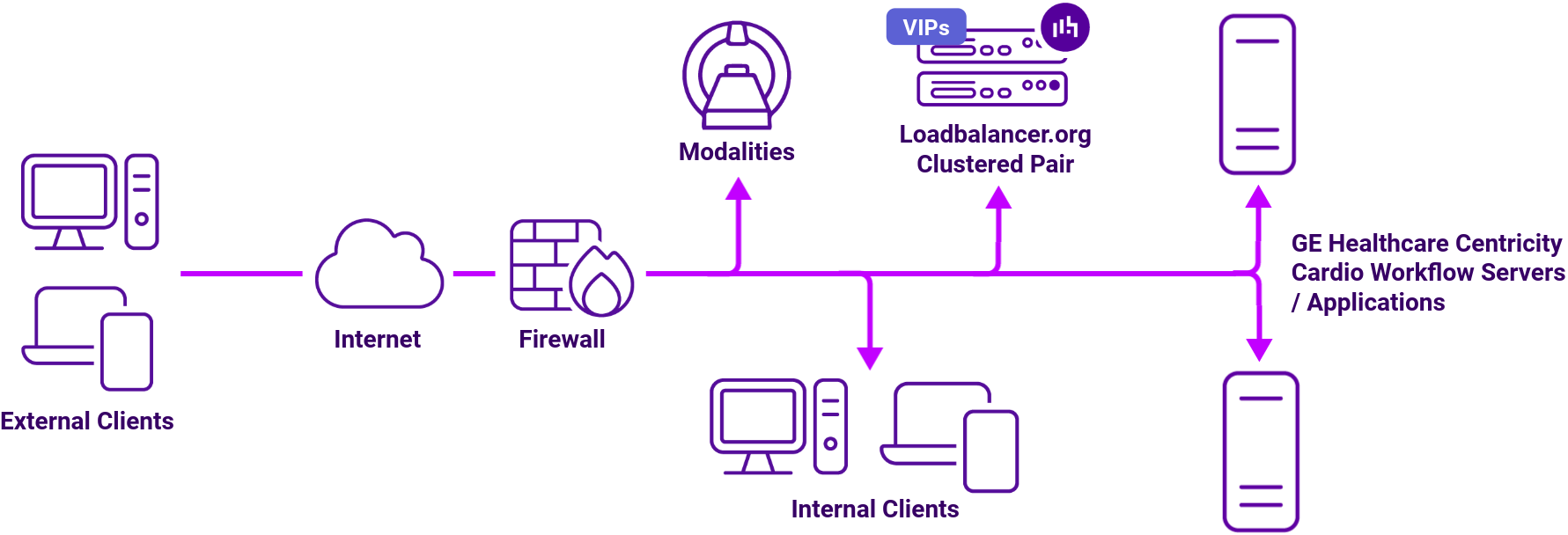
About Layer 4 DR mode load balancing
One-arm direct routing (DR) mode is a very high performance solution that requires little change to your existing infrastructure.
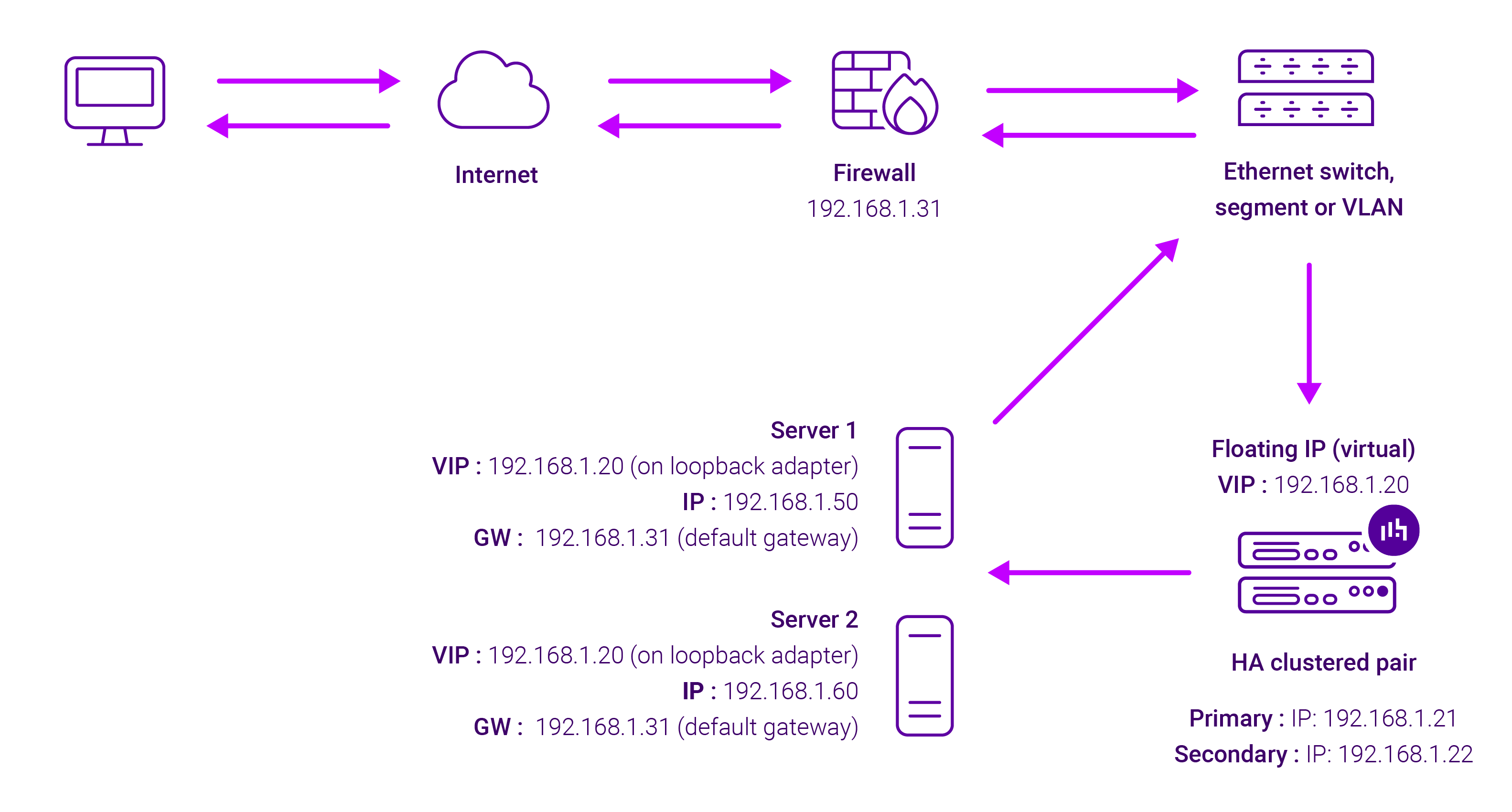
DR mode works by changing the destination MAC address of the incoming packet to match the selected Real Server on the fly which is very fast.
When the packet reaches the Real Server it expects the Real Server to own the Virtual Services IP address (VIP). This means that you need to ensure that the Real Server (and the load balanced application) respond to both the Real Server’s own IP address and the VIP.
The Real Servers should not respond to ARP requests for the VIP. Only the load balancer should do this. Configuring the Real Servers in this way is referred to as Solving the ARP problem.
On average, DR mode is 8 times quicker than NAT for HTTP, 50 times quicker for Terminal Services and much, much faster for streaming media or FTP.
The load balancer must have an Interface in the same subnet as the Real Servers to ensure Layer 2 connectivity required for DR mode to work.
The VIP can be brought up on the same subnet as the Real Servers, or on a different subnet provided that the load balancer has an interface in that subnet.
Port translation is not possible with DR mode, e.g. VIP:80 → RIP:8080 is not supported. DR mode is transparent, i.e. the Real Server will see the source IP address of the client.
About Layer 7 Reverse Proxy load balancing
Layer 7 Reverse Proxy uses a proxy (HAProxy) at the application layer. Inbound requests are terminated on the load balancer and HAProxy generates a new corresponding request to the chosen Real Server. As a result, Layer 7 is typically not as fast as the Layer 4 methods.
Layer 7 is typically chosen when enhanced options such as SSL termination, cookie based persistence, URL rewriting, header insertion/deletion etc. are required, or when the network topology prohibits the use of the Layer 4 methods.
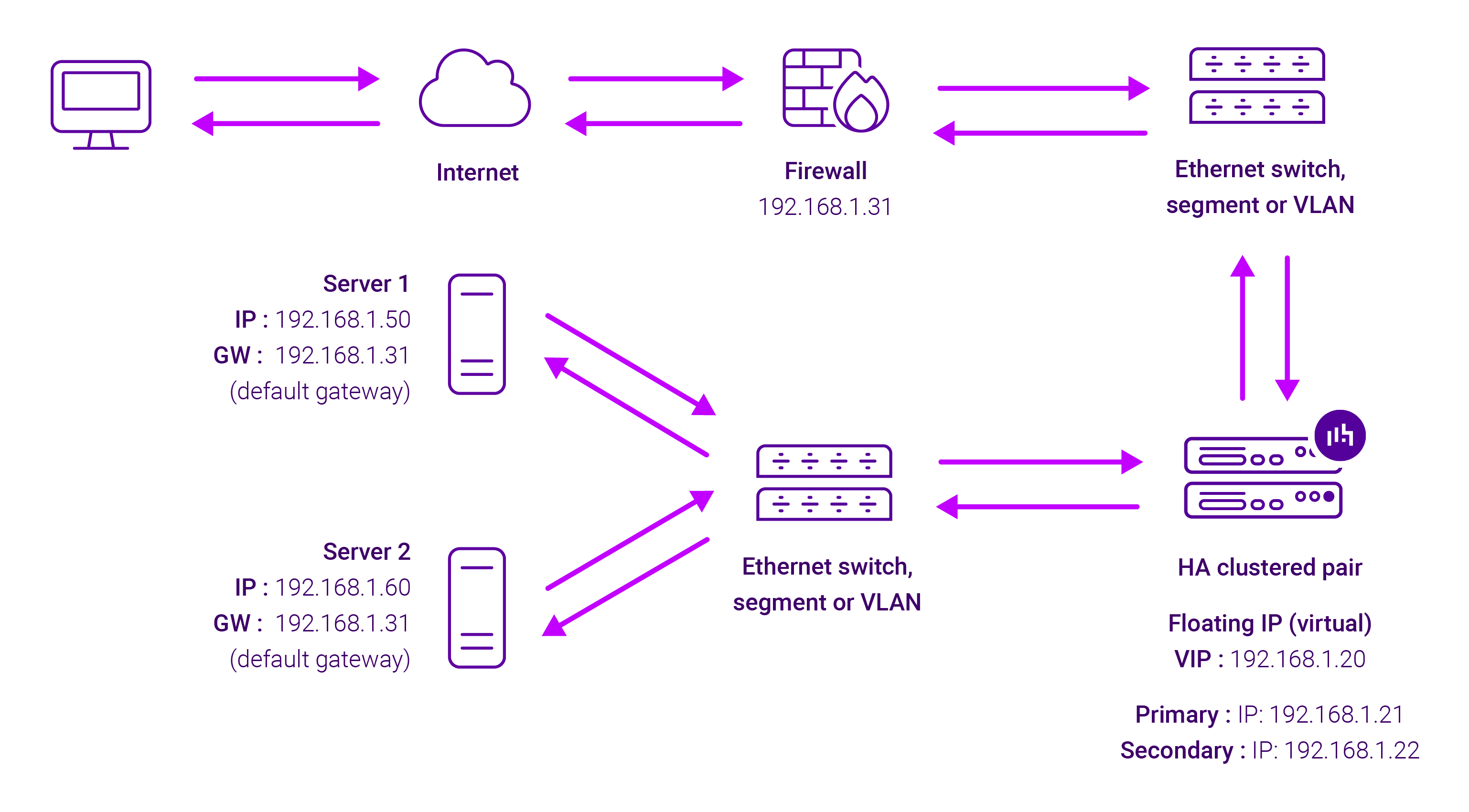
Because Layer 7 Reverse Proxy is a full proxy, any server in the cluster can be on any accessible subnet, including across the Internet or WAN.
Layer 7 Reverse Proxy is not transparent by default i.e. the Real Servers will not see the source IP address of the client, they will see the load balancer’s own IP address by default, or any other local appliance IP address if preferred (e.g. the VIP address). This can be configured per Layer 7 VIP.
If required, the load balancer can be configured to provide the actual client IP address to the Real Servers in two ways:
- Either by inserting a header that contains the client’s source IP address, or
- By modifying the Source Address field of the IP packets and replacing the IP address of the load balancer with the IP address of the client.
Layer 7 Reverse Proxy mode can be deployed using either a one-arm or two-arm configuration. For two-arm deployments, eth0 is normally used for the internal network and eth1 is used for the external network, although this is not mandatory.
No mode-specific configuration changes to the load balanced Real Servers are required.
Port translation is possible with Layer 7 Reverse Proxy e.g. VIP:80 → RIP:8080 is supported. You should not use the same RIP:PORT combination for Layer 7 Reverse Proxy VIPs and Layer 4 SNAT mode VIPs because the required firewall rules conflict.